
Spare Parts Finder for Construction and Municipal Machinery
On a construction site, every hour of downtime counts. Your customers find the wear part by machine number or assembly, see it in the drawing, and order before the next working day begins.
- Machine number, not just model number
- Hydraulics, undercarriage and attachments kept separate
- Import large catalogs from manufacturer data

When a machine stops, the whole site stops
An excavator, a wheel loader or a roller standing idle for lack of a wear part costs not just the price of the machine, but the entire crew waiting on it. So anyone selling construction machinery parts is, above all, selling speed: the right part on the first try, with no follow-up question.
Buyers here are almost always professionals — municipal depots, rental companies, workshops — who identify their machine by machine or serial number, not just by model. Two machines of the same model can have different hydraulic components depending on model year and equipment.
Machine number, not just model
The catalog leads to the assembly via manufacturer, series and serial number range — not just via the model. If an assembly changes within a series from a certain serial number onward, that range gets its own drawing, or the affected positions carry a note. That way, nobody orders the part for the wrong version.
Typical assemblies:
- HydraulicsPump, control units, cylinders, lines
- UndercarriageTracks, rollers, track tensioners, axles
- Engine and drivetrainInjection, cooling, transmission
- AttachmentsBuckets, grapples, quick couplers, their own wear parts
Import manufacturer data, don't retype it
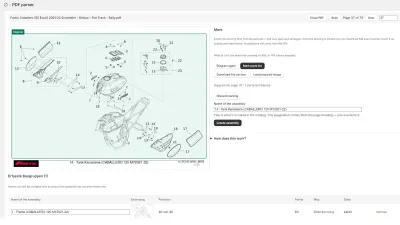
Construction machinery catalogs are large, often with thousands of positions across many series. If the catalog is available as a data package from the manufacturer or importer, the XML import takes over items, assemblies and drawings in one run: it recognizes supported manufacturer formats on its own, shows in advance what's in the package, and creates missing items on request with the prices from the file. If the catalog is only available as a PDF, the PDF parser reads position and part numbers from it.
Wear parts that need to be found fast
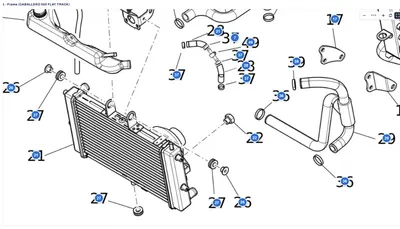
Chain links, sprockets, seal kits, filters: these parts are reordered regularly, often by workshops that already know their OEM number. The catalog search finds them regardless of hyphens and leading zeros, and a result leads straight into the drawing to the highlighted position — with stock and price shown before ordering.
The practicalities for rental companies and municipal depots
Rental companies and municipal depots often maintain their own fleets with many identical machines of different ages. A drawing that applies to several model years is linked once, not copied multiple times — if something changes, the correction applies everywhere it's linked, all at once.
Frequently Asked Questions
Is the model name enough, or do I need the machine number?
For many assemblies, the model is enough. Where hydraulics or the undercarriage differ within a model depending on the model year, the catalog should be structured by serial number range, or the affected positions should carry a note.
How quickly can an existing manufacturer catalog be imported?
If it's available as a data package (XML with drawings), the import runs largely automatically, with a trial run on a sample package beforehand. For PDF catalogs, the PDF parser reads positions and part numbers, even from scanned sheets with no text layer.
Can workshops order directly by part number?
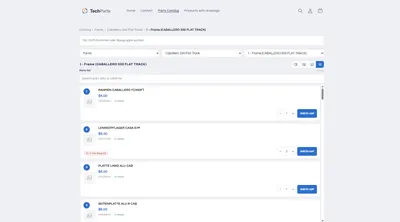
Yes. The “Parts list only” view shows the positions without the drawing, with a quantity selector and add-to-cart button in every row — for customers who already know their number and want to order quickly.
What does a catalog for multiple series cost?
Parts catalog and catalog search belong to the PRO plan, XML import and PDF parser to MAX. Prices are under Plans.
More on this in the Guide
-
Spare Parts Catalog in Machine and Plant Engineering: Publishing Bills of Materials Online
Publishing bills of materials and spare parts for machine and plant engineering online: model ranges, serial numbers, assemblies and reordering in your own Shopify shop. Read more -
Digitizing a Spare Parts Catalog: From PDF to a Clickable Drawing in the Shop
Manufacturer catalogs as PDF, supplier data as XML, products as CSV: how existing documents become an interactive spare parts catalog in the shop. Read more -
Avoiding Wrong Orders and Returns for Spare Parts
Why customers order the wrong spare part, and how a shop can prevent it: drawing, model matching, quantities, notes and superseded parts. Read more


See your own catalog in your own shop.
Install Techparts, set up one assembly, view it in the shop. The free plan covers fifteen products with a drawing, with no time limit.