
Selling Spare Parts with Shopify: The Shop Where Customers Find Their Part
Shopify can sell spare parts, but it can't help customers find them. Techparts adds what a spare parts shop is missing: the path via model and assembly, the drawing with its bill of materials, and search by part number.
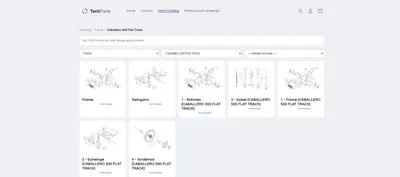
- Parts catalog by manufacturer, model, and year
- Exploded views with bill of materials
- Import from PDF, XML, and CSV

What a Shopify store for spare parts is missing
Shopify brings checkout, payment methods, hosting, and speed. For spare parts, though, the most important thing is still missing: the customer has to find their part first. They know their machine, but not the name of the part — and often not its number either.
An ordinary shop offers them collections, filters and a product search. What's missing is the path from the machine to the assembly, the picture where they recognize the part, and a search that knows which model a result belongs to. The result is phone calls, emails with phone photos, and wrong orders. More on that in the guide article selling spare parts online.
What Techparts adds
- Parts catalogA tree from manufacturer through model and year down to assembly, shown in the shop as selection fields and tiles.
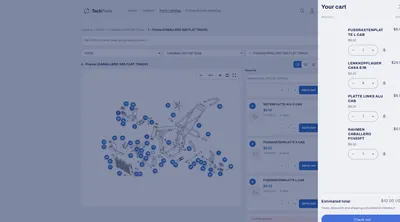
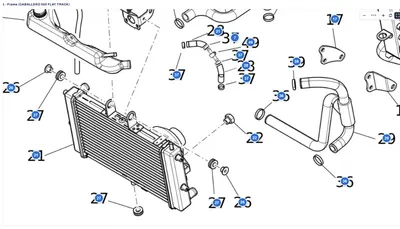
- Exploded viewEvery part with its item number, zoomable, with full-screen view and multiple sheets per assembly.
- Parts listSKU and OEM number, price, stock, quantity needed, and notes for every item.
- Catalog searchFinds parts and models, even with hyphens and leading zeros, and jumps straight to the item.
- Cart straight from the drawingFrom the row or the card at the hotspot, straight into Shopify's own cart.
- ImportsPDF catalogs, supplier data as XML, and items via CSV from your inventory management system.
- MaintenanceIf a part number changes, the item is replaced across every drawing at once.
- Your data, your shopThe catalog and drawings live as metaobjects in Shopify, even after you uninstall.

For every product range
The catalog doesn't know industries, only a tree whose levels you name. That's why it works just as well for motorcycles as for coffee machines:
- Vehicles: Motorcycles, Car parts, Boats, Motorhomes, Bicycles
- Machinery: Agricultural machinery, Construction machinery, Mechanical and plant engineering
- Equipment: Garden equipment, Home appliances, Commercial kitchen equipment
A complete overview by industry is under Industries.
If you sell products individually — appliances or furniture, for example — you attach the drawing directly to the product. The product page then provides the context, so a catalog tree isn't even needed.
Bring in your existing catalogs
| What you have | Path into the shop | Plan |
|---|---|---|
| PDF catalog with drawing and bill of materials | PDF parser: frame, read, match | MAX |
| Supplier data as a ZIP with XML | XML import: items, tree, and assemblies in one run | MAX |
| Spreadsheet from your inventory management system | CSV import of items, images included | PRO |
| Single drawing as an image | Editor: place hotspots with a double-click | all |
The paths are described in detail in the article digitizing a spare parts catalog.
Start small, grow with your product range
The free CORE plan covers fifteen products with a drawing, no time limit: enough to see in your own shop whether the approach fits. PRO brings the parts catalog, catalog search, CSV import and replacing products. MAX adds PDF parser, XML import, backup and migration. Prices are under Plans.
Frequently Asked Questions
Is Techparts its own shop software?
No. Techparts is an app within your Shopify store. Spare parts remain regular Shopify products with price, stock, and variants; orders go through Shopify's own cart and checkout. There's no second system where prices have to be maintained twice.
How quickly can the first drawing be live in the shop?
Install the app, drag the "Exploded View" block into the product template in the theme editor, upload a drawing, and place the hotspots: the first drawing is live in the shop within minutes. How long a full catalog takes mostly depends on how many items still need to be created.
What languages does Techparts support?
Both the admin and the storefront are available in German, English, and Spanish. The admin follows the language of your Shopify admin, and the storefront follows your theme's language files.
What happens to my data if I cancel?
Categories and drawings are stored as metaobjects in your shop and stay there, even after you uninstall the app. Downgrading deactivates the catalog rather than deleting it, and an upgrade brings it back in full.
More on this in the Guide
-
Selling Spare Parts Online: A Guide for Dealers and Manufacturers
Selling spare parts online: what sets spare parts shops apart from ordinary ones, what data you need, and how customers order without a follow-up call. Read more -
Spare Parts Catalog in Shopify: How Customers Find the Right Part
How a spare parts catalog is built in Shopify: category tree, exploded views with hotspots, parts list and search by part number. Read more -
Avoiding Wrong Orders and Returns for Spare Parts
Why customers order the wrong spare part, and how a shop can prevent it: drawing, model matching, quantities, notes and superseded parts. Read more


See your own catalog in your own shop.
Install Techparts, set up one assembly, view it in the shop. The free plan covers fifteen products with a drawing, with no time limit.