
Spare Parts Finder for Model Making, RC and Specialty Vehicles
An RC model is made up of a hundred small, similar-looking parts. Your customers zoom in and point to the right screw or the right gear instead of describing it.
- Many small parts, shown clearly distinguishable
- Variants by model and version
- From a crash to the spare parts list, fast

One model, a hundred small parts
Hardly any product range is as fine-grained as model making. An RC car or a model helicopter consists of dozens of screws, bearings, gears, and plastic parts, many of which look the same at first glance yet differ in length, thread, or material. Customers who want to replace a part after a fall or crash can rarely name it — at best, they recognize it visually.
This is exactly where the value of the exploded view shows: the customer doesn't have to describe the part, they just zoom in and point to it.
Small, but clearly distinguishable
- Zoom down to the last detailMouse wheel at the desk, two fingers on the phone. The item numbers stay with their part and grow along with their label.
- Full screenfor dense assemblies like a complete gearbox or a rotor head.
- Parts list with SKUat every line item, so repeat buyers can search directly by the number they already know.
- Parts installed multiple times, combinedif a screw appears twelve times, it's listed once, marked as “12× in the drawing.”
Variants that differ only in the details
Model kits often come in several versions — standard, sport, special edition — that differ in only a few parts. For most of the assembly, one shared drawing linked from all versions is enough; only the parts that actually differ get their own line items or a note. That way, no copy of an almost identical drawing is created that would later need to be maintained in two places.
From a crash to the spare parts list, fast
Anyone repairing their model usually wants to order several parts at once: the broken strut, the bent axle, plus a few spare screws while they're at it. The parts list next to the drawing allows exactly that — every needed line item goes into the cart with one click, with a pre-filled quantity, without ever having to leave the drawing.
Frequently Asked Questions
How do I tell very similar small parts apart in the drawing?
Through the zoom, which stays sharp as you zoom in, and through tightly labeled item numbers that grow along with their label. A note on the line item additionally helps with parts that differ only in detail, such as screw length.
Can I represent multiple versions of the same model?
Yes. Identical parts are attached to one shared drawing linked from all versions. Only the parts that actually differ get their own line items.
Is this suitable for a small model-making shop with only a few models?
Yes. Anyone who only wants to show individual models with a drawing can get by with the drawing on the product in the free plan, with no catalog tree at all.
What does a full catalog with multiple model series cost?
Parts catalog and catalog search belong to the PRO plan. Details are under Plans.
More on this in the Guide
-
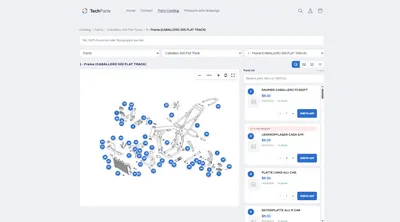
Interactive Exploded View: Hotspots, Parts List and Cart in the Shop
What an interactive exploded view has to deliver in the shop: numbered hotspots, a linked parts list, zoom, cart – and how it gets into Shopify. Read more -
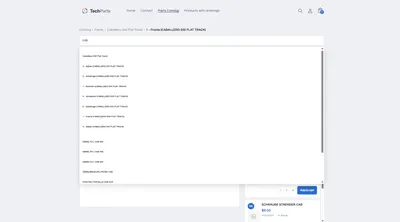
Spare Parts Search by Part Number: SKUs and OEM Numbers That Actually Get Found
Why customers often can't find their part number in the shop – leading zeros, hyphens, old numbers – and how a spare parts search finds it anyway. Read more -
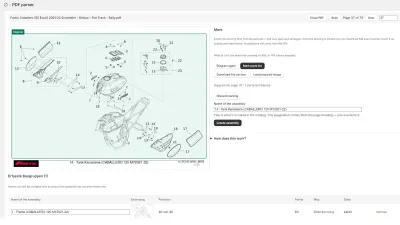
Digitizing a Spare Parts Catalog: From PDF to a Clickable Drawing in the Shop
Manufacturer catalogs as PDF, supplier data as XML, products as CSV: how existing documents become an interactive spare parts catalog in the shop. Read more


See your own catalog in your own shop.
Install Techparts, set up one assembly, view it in the shop. The free plan covers fifteen products with a drawing, with no time limit.