
Spare Parts Finder for Boats, Yachts and Outboards
Whether it's the outboard motor, the rig or the onboard electrics: your customers find the part through the system it belongs to, see it in the exploded view, and order in good time before the season — not only once the boat is already in the water.
- Organized by system, not just by model
- Multiple engine brands in one catalog
- Spring rush without a support backlog

A boat is many systems in one hull
A car comes from one manufacturer. A boat rarely does: the hull is from the boatyard, the outboard motor from Yamaha, Mercury or Honda, the anchor winch from Lewmar, the chartplotter system from Raymarine. So anyone selling boat spare parts rarely sells “parts for model X”, but rather parts for a system within a boat: engine, drivetrain, hull fittings, rig, electrics, plumbing.
A parts finder for this industry doesn't necessarily have to start with the boat model — it can just as well start with the system, and still end up in the same assembly with its exploded view.
Two paths, one destination: the assembly
- Via the engineMake, series, horsepower class, then the assembly: fuel system, cooling, gearbox, propeller.
- Via the system on the hullRig and sailing fittings, anchor winch, bilge pump, onboard electrics, plumbing — independent of the boat model, because the same winch can be fitted in ten different hulls.
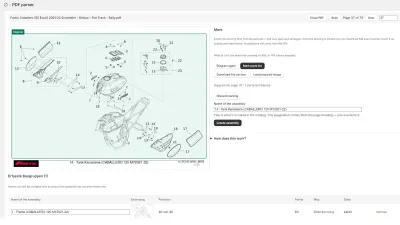
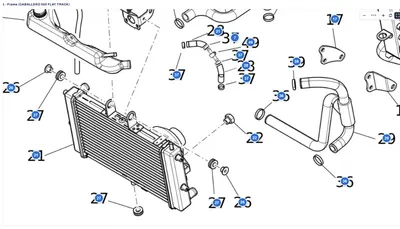
Both paths lead to the same assembly with exploded view and parts list: numbered hotspots, SKU and OEM number, price, stock and quantity needed at every position. A click on the hotspot highlights the row, and from the row the part goes into the cart.
Multiple engine brands, one catalog
A chandlery rarely carries just one outboard motor brand. Techparts' catalog holds any number of manufacturers side by side, each with its own series and its own assemblies. Parts that are identical across several engine series hang off a single drawing linked from multiple places — a correction to the drawing applies everywhere.
Ordered before the season, not searched for during it
The boat spare parts business is heavily concentrated in spring: winter storage over, season start ahead, everyone wants to get on the water at the same time. That's exactly when support can't afford to be tied up with “which part do you need”. A customer who finds their own system, looks up their own part number and orders straight from the drawing needs no follow-up question — and the office team can focus on the cases that really need advice.
Clearly labeling saltwater-resistant parts
Boat parts often differ by version: freshwater or saltwater, galvanized or stainless steel, with or without anode protection. These differences belong in the parts list — as a note on the position or as a separate position with its own SKU — not in a footnote that gets overlooked when ordering.
Frequently Asked Questions
Do I need to create a separate catalog branch for every boat model?
No. Identical systems, such as a particular outboard motor or a particular anchor winch, get one drawing that's linked from every boat model it's fitted in. A correction to the drawing applies everywhere.
Can I distinguish between freshwater and saltwater versions?
Yes, either through separate positions with their own SKU or through a note on the position. Both versions can also be stored as alternatives on the same position, so the customer can compare them directly.
How do I handle multiple outboard motor brands?
Every brand gets its own level in the catalog tree, with its own series and assemblies. The customer chooses the make and series just like with a vehicle, or searches directly for the part number across the whole catalog.
What does it cost to get started?
The drawing on the product is included in the free plan, for up to fifteen products with a drawing and no time limit. A full catalog with multiple manufacturers and model series belongs to the PRO plan. Prices are under Plans.
More on this in the Guide
-
Spare Parts Search by Part Number: SKUs and OEM Numbers That Actually Get Found
Why customers often can't find their part number in the shop – leading zeros, hyphens, old numbers – and how a spare parts search finds it anyway. Read more -
Digitizing a Spare Parts Catalog: From PDF to a Clickable Drawing in the Shop
Manufacturer catalogs as PDF, supplier data as XML, products as CSV: how existing documents become an interactive spare parts catalog in the shop. Read more -
Avoiding Wrong Orders and Returns for Spare Parts
Why customers order the wrong spare part, and how a shop can prevent it: drawing, model matching, quantities, notes and superseded parts. Read more


See your own catalog in your own shop.
Install Techparts, set up one assembly, view it in the shop. The free plan covers fifteen products with a drawing, with no time limit.