
Bringing a PDF Spare Parts Catalog into Shopify
You already have the catalog — as a PDF from the manufacturer, or as a scan from the filing cabinet. Frame the drawing and the bill of materials in your browser, and the rest lands in the shop automatically.
- Mark the drawing and bill of materials with frames
- Item numbers read from text or image
- Even with scanned paper catalogs

The catalog already exists. It just needs to get into the shop.
Most spare parts dealers don't start from zero. There are manufacturer catalogs, PDF files with exploded views and bills of materials, often built up over decades. Transferring them into a shop by hand would take weeks. The PDF parser takes on exactly this work: you open the PDF in your browser and mark two frames, and it handles the rest.
Two frames, that's all it takes
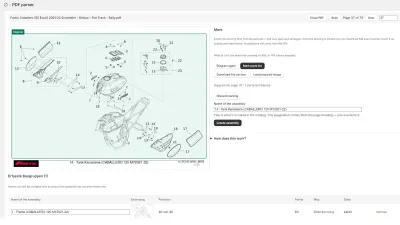
- Open the PDF — it stays on your computer, is read in the browser, and you page through it with buttons or the mouse wheel.
- Frame the drawing — the frame determines which section is later visible in the shop.
- Frame the bill of materials — from this, the parser reads item numbers and SKUs.
- Match items — by SKU, barcode, or not at all, decided once for the whole shop.
Text or image: the file decides which path applies
There are two ways to get the item numbers, and the parser chooses on its own: if they're in the PDF's text layer, they're read directly. If the sheet is just an image, as with a scanned paper catalog, they're recognized from the image. A status line in the app shows which method currently applies — you don't have to judge that yourself.
What else the parser takes care of
- Bills of materials spanning several pagesare merged together when an assembly doesn't fit on one sheet.
- Several items per position, for example variants of the same part.
- A bill of materials sitting in the middle of the drawingis painted over in white in the image, so it doesn't appear twice in the shop.
- "Download crop"gives you exactly the sheet the parser would otherwise have used itself — edit it externally and load it back with "Upload processed image". The item numbers still come from the PDF and can't end up misaligned.
- Choose the destination in the catalog, level by level, creating new entries at any level too.
After the run, a report shows how many assemblies, hotspots, and linked items were created, and which numbers weren't found in the shop — the working basis for the next step.
From a single drawing to a complete catalog
The PDF parser works assembly by assembly, so it can also be used for just a single section of a catalog you want to show in your shop. For entire manufacturer catalogs with hundreds of assemblies, the same path leads to the goal, just repeated more often: open the sheet, box it in, move to the next sheet. What becomes of that in the catalog tree afterward is described on the spare parts catalog in Shopify page.
Frequently Asked Questions
Does this also work with old, scanned catalogs?
Yes. If the PDF has no text layer, the parser recognizes the item numbers from the image. The quality of the scan then determines how finely the recognition still works — the sharper the scan, the more reliable the result.
What if the bill of materials sits in the middle of the drawing?
The parser paints over it in white in the image, so it doesn't appear in the shop alongside the actual parts list. Otherwise, the drawing stays unchanged.
Can I still edit the image before importing it?
Yes, with "Download crop" you get exactly the sheet the parser would otherwise have used itself. Once edited externally — cut out or sharpened, for example — you load it back with "Upload processed image"; the item numbers still come from the PDF.
Which plan includes the PDF parser?
The PDF parser belongs to the MAX plan. Details are under Plans.
More on this in the Guide
-
Digitizing a Spare Parts Catalog: From PDF to a Clickable Drawing in the Shop
Manufacturer catalogs as PDF, supplier data as XML, products as CSV: how existing documents become an interactive spare parts catalog in the shop. Read more -

Interactive Exploded View: Hotspots, Parts List and Cart in the Shop
What an interactive exploded view has to deliver in the shop: numbered hotspots, a linked parts list, zoom, cart – and how it gets into Shopify. Read more -

Spare Parts Catalog in Shopify: How Customers Find the Right Part
How a spare parts catalog is built in Shopify: category tree, exploded views with hotspots, parts list and search by part number. Read more


See your own catalog in your own shop.
Install Techparts, set up one assembly, view it in the shop. The free plan covers fifteen products with a drawing, with no time limit.