
Spare Parts Finder for Motorcycles, Quads and Powersports
From the frame down to the circlip: your customers pick their motorcycle, scooter or quad, open the assembly, and add the part to the cart straight from the exploded view.
- Motorcycles, scooters, quads and motocross bikes
- Import manufacturer catalogs via PDF or XML
- One drawing for multiple model years

What your customers see in the shop
- Parts finderMake, model and model year as selection fields, then the assembly as a tile with an image.
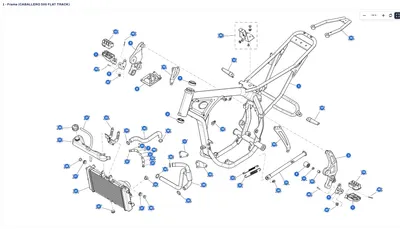
- Exploded viewFrame, engine, chassis: zoomable, full screen, every part with its position number.
- Parts list with OEM numberSKU and OEM number, price, stock and quantity needed at every position.
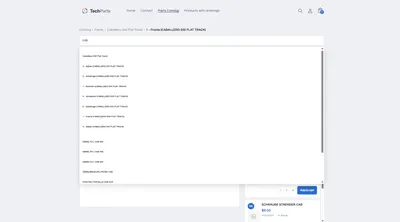
- Search by model and number“MXU 500” finds the vehicle, an OEM number finds the part, with or without hyphens.
- Multiple sheetsEngine left and right, frame and fairing: tabs above the drawing switch sheet and list.
- Cart straight from the drawingFrom the row or the card at the hotspot, straight into Shopify's own cart.

Import manufacturer catalogs instead of retyping them
A motorcycle catalog quickly runs to thousands of positions. Nobody sets those by hand.
If your importer or supplier delivers their catalogs as a data package, the XML import takes them over in one run. It recognizes supported manufacturer formats on its own and shows in advance the models, assemblies, drawings and part numbers — and what's missing, too. In the first step, it looks up the items in the shop and creates missing ones on request, using the prices from the file. In the second, models, assemblies, drawings and positions are created, in rounds with a progress bar. A sample package lets you do a trial run before the real catalog.
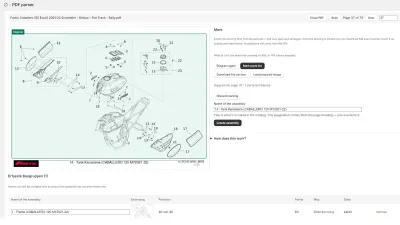
If the catalog is a PDF, box in the drawing and the bill of materials in the PDF parser, and it reads off position numbers and SKUs, from the image itself in the case of scans. How both work is covered in the article digitizing a spare parts catalog.
Maintaining across model years
- Multiple model years point to the same drawing, and a correction applies everywhere.
- If a model year differs, the drawing is copied along with its positions and adjusted.
- Assemblies can be selected and copied or moved together into another model.
- When a part number changes, the item is replaced across all drawings at once.
- New models are created as drafts and only appear in the shop once published.
Measured against real catalogs
Techparts has been benchmarked against real catalogs with thousands of assemblies and tens of thousands of positions. Only what has changed gets published: 8.8 seconds instead of 40.1 on a real catalog. The search loads only its slice of the index per request — about 128 kB on average, no matter how large the catalog is.
How to sensibly structure a motorcycle parts shop, from the assemblies down to workshop customers, is covered in the guide article selling motorcycle parts online.
Frequently Asked Questions
Does this also work for scooters, quads and motocross bikes?
Yes. The catalog doesn't know vehicle types, only a tree whose levels you name. Scooters, quads, ATVs, enduros and motocross bikes simply get their own branch.
How long does importing a manufacturer catalog take?
That mainly depends on how many items have to be newly created, because creating one costs roughly fifteen times as much as looking one up. The import runs in rounds: if the connection drops, nothing is lost. Whatever was once matched stays remembered, and the next run is noticeably faster.
Can workshops order by number?
Yes. The search finds OEM and SKU numbers across the whole catalog, and the “Parts list only” view shows the positions without the drawing, with a quantity selector and add-to-cart button in every row.
What does it cost?
Parts finder, catalog search and CSV import come with PRO, PDF parser and XML import with MAX. Anyone who first wants to show individual models with a drawing on the product can start on the free plan. Prices are under Plans.
More on this in the Guide
-
Selling Motorcycle Parts Online: The Spare Parts Shop for Motorcycles, Scooters and Quads
Selling motorcycle parts online: how a shop organizes makes, models, model years and OEM numbers so customers order the right part without a follow-up question. Read more -
Spare Parts Search by Part Number: SKUs and OEM Numbers That Actually Get Found
Why customers often can't find their part number in the shop – leading zeros, hyphens, old numbers – and how a spare parts search finds it anyway. Read more -
Digitizing a Spare Parts Catalog: From PDF to a Clickable Drawing in the Shop
Manufacturer catalogs as PDF, supplier data as XML, products as CSV: how existing documents become an interactive spare parts catalog in the shop. Read more


See your own catalog in your own shop.
Install Techparts, set up one assembly, view it in the shop. The free plan covers fifteen products with a drawing, with no time limit.