
Spare Parts Finder for Commercial Kitchen Equipment
A combi steamer that breaks down brings the whole kitchen operation to a halt. Your service technicians find the part by OEM number or assembly and order directly from the drawing, without interrupting the job.
- Built for service technicians on the job
- Multiple equipment manufacturers in one catalog
- OEM number search right on site

Kitchen downtime is always urgent
If the combi steamer or dishwasher fails in a restaurant kitchen, the operation grinds to a halt that same evening. Buyers of commercial kitchen spare parts are therefore almost always under time pressure: service technicians on site at the customer's, head chefs replacing a wear part themselves, or maintenance companies with a fully booked schedule. For them, one thing matters above all: finding the part in seconds, not minutes.
Built for the service technician on the job
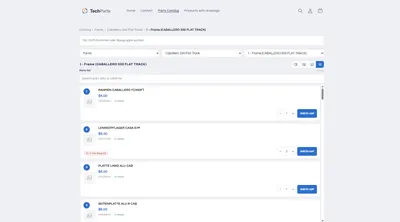
- Parts list onlyFor technicians who already know their OEM number: positions without a drawing, with a quantity selector and add-to-cart button in every row — also works well on a phone on site.
- Search by OEM numberFinds the number regardless of hyphens and leading zeros, directly across the whole catalog.
- Exploded view for unfamiliar assembliesWhen a technician can't name the part right away, the drawing shows which position is meant.
- Stock visible before orderingImportant when a replacement unit needs to be ready at short notice and the part has to ship the same day.
Multiple equipment manufacturers, one catalog
A maintenance business rarely services just one brand. Rational, Winterhalter, Meiko, Electrolux Professional: each manufacturer gets its own branch in the catalog, with its own assemblies and drawings, but the same search and the same ordering flow for the technician. That way, the path to the part stays the same, no matter which machine the technician happens to be standing in front of.
Assemblies the way service technicians know them
- Chamber and loadingSeals, guides, lighting
- Water and steam systemPumps, valves, boiler, descaling
- Controls and electricsCircuit boards, sensors, control panel
- Refrigeration and washing technologyCompressors, baskets, spray arms, filters
Maintenance contracts benefit from fast spare parts sourcing
Anyone offering maintenance contracts is also promising fast response times. A catalog where your own service technician can search for the OEM number right at the appliance and order immediately shortens exactly the time between diagnosis and spare part — no need to check back with the office, no second phone call.
Frequently Asked Questions
Can service technicians order on the go from their phone?
Yes. The "parts list only" view shows the positions without a drawing, compact enough for a phone screen, with a quantity selector and add-to-cart button right in the row.
How do I represent multiple equipment manufacturers in one catalog?
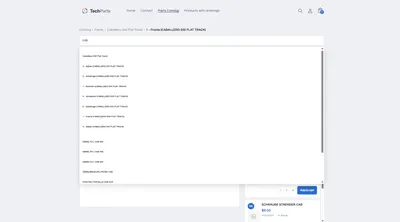
Each manufacturer gets its own branch in the catalog tree, with its own series and assemblies. The catalog search covers all manufacturers together, so a technician doesn't have to choose in advance which branch to search under.
Does this also work for small maintenance businesses with only a few appliances?
Yes. If you only want to show individual appliance types with a drawing, the drawing on the product in the free plan is enough. A catalog tree across multiple manufacturers pays off once your range grows.
What does a catalog for multiple equipment manufacturers cost?
Parts catalog and catalog search belong to the PRO plan, larger data imports from PDF or XML to MAX. Prices are under Plans.
More on this in the Guide
-
Spare Parts Catalog in Machine and Plant Engineering: Publishing Bills of Materials Online
Publishing bills of materials and spare parts for machine and plant engineering online: model ranges, serial numbers, assemblies and reordering in your own Shopify shop. Read more -
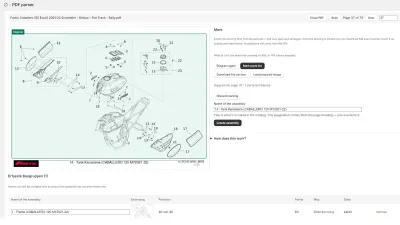
Digitizing a Spare Parts Catalog: From PDF to a Clickable Drawing in the Shop
Manufacturer catalogs as PDF, supplier data as XML, products as CSV: how existing documents become an interactive spare parts catalog in the shop. Read more -
Spare Parts Search by Part Number: SKUs and OEM Numbers That Actually Get Found
Why customers often can't find their part number in the shop – leading zeros, hyphens, old numbers – and how a spare parts search finds it anyway. Read more


See your own catalog in your own shop.
Install Techparts, set up one assembly, view it in the shop. The free plan covers fifteen products with a drawing, with no time limit.